
Game Pad, Tools and Inventory
Find the inventory, partner, clothing and favorites menus and recognize the five tool types shown in the official manual.
FAQ
What can you inspect in the Game Pad?
How should you read the tool gauge?
What can you inspect in the Game Pad?
Use Inventory to see the tools you currently have, Partner to inspect available companions and special clothing, and Clothing or Favorites to manage outfits. Learn these menu purposes before searching for a separate equipment screen. The documented tool lineup identifies categories; it does not prove that every tool is owned immediately.
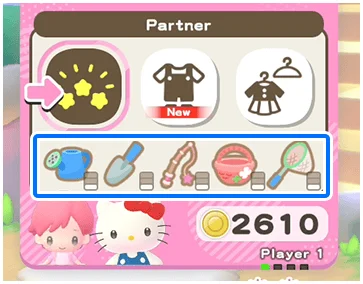
How should you read the tool gauge?
The manual says the gauge at the bottom right reflects the tool’s current ability level and grows as that level increases. It does not give a numerical upgrade formula or say the bar is a breakage countdown. This guide therefore does not invent bait recipes, catch rates or tool-durability repair methods.
Where can tools appear as rewards?
The Creative Labo’s Labo Puzzle is described as offering coins, stickers or tools. Check the currently available facility and displayed reward before choosing an activity solely for a particular item. More facilities open through progression, so combine the inventory check with your current Hometown access rather than assuming every reward route is already available.
Related guides
Related Articles
activities
Board Games and Difficulty-Based Targets
Compare Blooming Flower Festival, Tropical Twilight and Sparkling Neon Night, including Medium-only delivery targets and how days end.
activities
Board Spaces and Route Planning
Recognize shop, challenge, item and map-specific spaces before risking your flowers, droplets or sparks on a detour.
activities
Melody Cake: How to Play Music and Use Catalogs
Create percussion and melody on cakes, connect matching patterns and organize music across four catalogs with sixteen cakes each.
Was this helpful?
Thanks for the feedback!