
Local Co-op and Host Controls
Start a same-console session, add user profiles or guests, and understand why the host controls menus, cameras, buildings and activities.
FAQ
How do additional players join locally?
Which actions belong to the host?
How do additional players join locally?
Choose the player count with the main controller before entering the session. For two to four players, the additional participants select their own user profiles or join as guests. Profile users appear with their profile names. A local session on the same console is a different setup from creating an internet room.
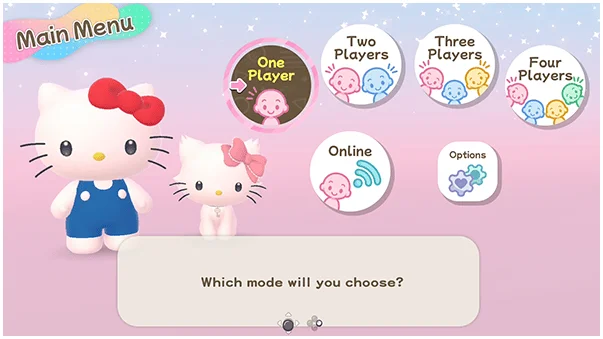
Which actions belong to the host?
The host handles menu selections, camera use, opening the Sticker Book, entering and leaving buildings, starting activities and pausing. This includes starting board games, minigames, Melody Cake and Poster Studio. Agree on who will operate these shared choices before beginning, particularly when teaching a younger or first-time player.
Why does a second controller seem unable to interact?
First determine whether the attempted action is host-only. An inactive shared menu is not, by itself, evidence of a disconnected controller. Test an ordinary movement action and check the session’s controller arrangement before troubleshooting hardware. In an online session the room creator is the host, rather than automatically applying the offline controller-1 rule.
Related guides
Related Articles
activities
Board Games and Difficulty-Based Targets
Compare Blooming Flower Festival, Tropical Twilight and Sparkling Neon Night, including Medium-only delivery targets and how days end.
activities
Board Spaces and Route Planning
Recognize shop, challenge, item and map-specific spaces before risking your flowers, droplets or sparks on a detour.
activities
Melody Cake: How to Play Music and Use Catalogs
Create percussion and melody on cakes, connect matching patterns and organize music across four catalogs with sixteen cakes each.
Was this helpful?
Thanks for the feedback!